.png)
5. Impact Drivers
Impact Drivers are at the heart of ImpactPilot. An Impact Driver is a concrete customer-value event or operational milestone that translates Customer Success work into measurable business results.
This article explains:
- What Impact Drivers are
- How to manage them with your team
- How Impact Points work
- What cycles are and how transitions work
- How automated transitions and AI detection save time
1. What are Impact Drivers?
An Impact Driver is a concrete customer-value event or operational milestone that translates Customer Success work into measurable business results.
Examples are:
- Enabling SSO
- Closing an upsell
- Documenting success criteria
- Hosting an adoption workshop
👉 Tip: check out our Impact Driver Library for more examples
2. Managing Impact Drivers
Impact Drivers are usually tied to customer journey phases or segments.
Example: In the Adoption phase, the team may agree that the key drivers are:
- Hosting an adoption workshop
- Creating an integration from the marketplace
- Gaining a positive review on a review site
Each Impact Driver can be given a point value that reflects its impact. For example, an adoption workshop may be worth 2 points.
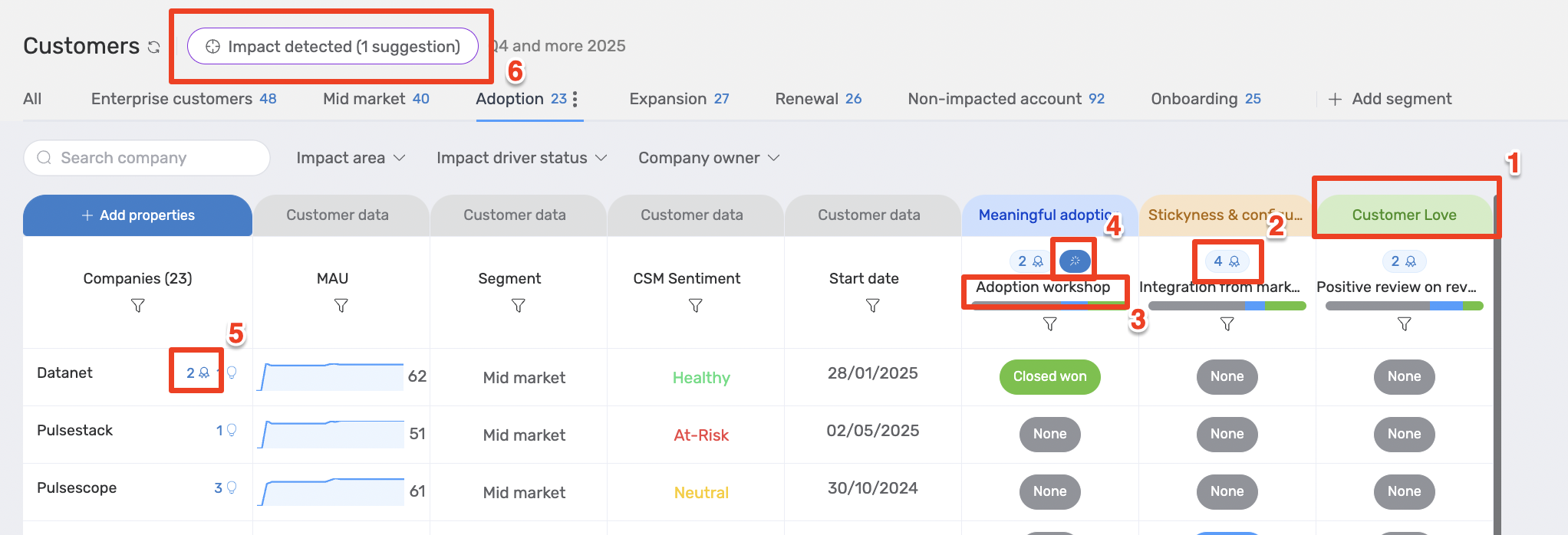
In the above screenshot we can find several important pieces of information on Impact Drivers:
- Impact Area: the area is a category that Impact Drivers can be grouped under
- Impact Points per Impact Driver: this badge indicates how much points can be earned from this impact driver
- Impact Driver: this shows the name of the Impact Driver
- Transition: this blue spark indicates if an automated transition is put in place for this Impact Driver
- Impact Points per Account: this badge shows how much Impact Points are earned per customer in total
- Impact detected: this button shows suggested Impact Drivers based on the transition that is set up.
Note: if you want to learn more about Transitions, feel free to check out this article or reach out to your admin!
3. Impact Points
Impact Points show how much impact you’ve made in a period of time.
- Closing an Impact Driver adds the agreed number of points.
- The left sidebar shows your accumulated points for each customer.
- You can pitch, close lost, and close won Impact Drivers as you work on them.
👉 Example: If you close an adoption workshop (2 points) and an integration marketplace (4 points), you gain 6 points for that customer. This is reflected in the leaderboard at the top reports.
4. Cycles
Impact Points are tracked within a defined cycle, usually a quarter.
- A cycle has a target for how many points should be achieved.
- You can see the number of accounts you need to impact within that cycle.
5. Automated Transitions
To reduce admin work, ImpactPilot supports automated transitions.
-
Look for the spark icon next to points — it indicates an automated rule is in place.
Example:
- If an Auto-Renewal property changes to “Yes,” the related Impact Driver can close automatically.
- If a HubSpot activity confirms an Adoption Workshop, the driver is suggested as closed.
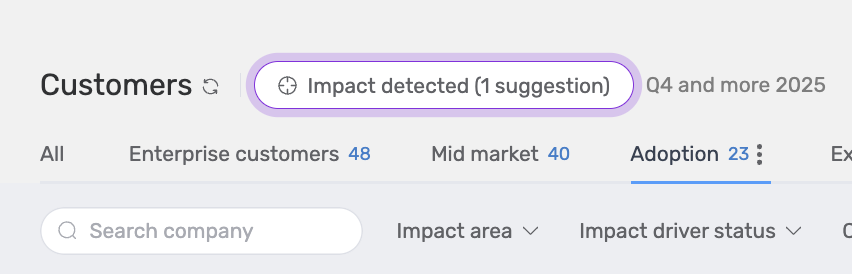
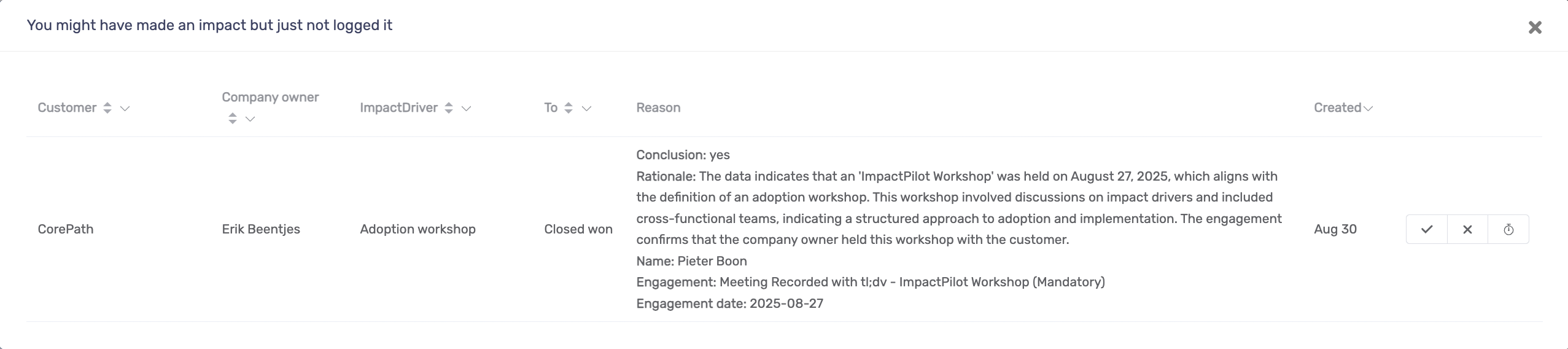
If a transition has detected a suggested Impact Driver to close. Click on the button and you'll have several options.
- ✅ Confirm (close won)
- ❎ Mark incorrect (ignore)
- ⏰ Snooze (for 10 days)
👉 Check with your admin which automated transitions are set up for your team.
6. Summary
With Impact Drivers you can:
- Agree as a team on measurable customer-value events
- Track progress with Impact Points per cycle
- Streamline management with automated transitions and AI detection
This ensures Customer Success work is aligned, measurable, and impactful.
✅ Next step: Learn how to connect Impact Drivers to HubSpot reports to measure value creation across your portfolio.